






Flutter AI App Development Services

What Are Flutter AI App Development Services?

What Are Flutter AI App Development Services?

Flutter AI app development services add AI features to Flutter apps for iOS, Android and web from one codebase. HireFlutterDev builds in-app assistants and AI chatbots, smart search, document scanning, voice features and on-device AI using Google's official Flutter and Firebase AI tools, and offers ChatGPT integration services for apps that use OpenAI models.
Already have a Flutter app? We can add AI to it without a rebuild.

AI Features We Build into Flutter Apps

AI in mobile app development works best when each feature starts from a problem your users or your team already have.
01

In-App AI Assistants

Flutter chatbots that answer common questions inside the app and hand over to a person when needed, so your support team handles fewer repeat requests.

04

Voice and Translation

Add voice input, text-to-speech and translation for hands-free use and wider accessibility.

07

AI Agents and Automation

Let the app complete multi-step tasks, such as bookings or form filling, by calling your own APIs.

02

Smart Search and RAG

Let users search in their own words and get answers grounded in your own content, not only keyword matches.

05

Personalized Recommendations

Suggest content, products or next steps from each user's activity to keep them engaged.

08

On-Device AI

Run models on the phone for offline use, faster responses and data that never leaves the device.

view more
03

Document Scanning and OCR

Read receipts, IDs and forms with the camera and fill in fields automatically, so users type less.

06

Generative Content

Summarize, rewrite and generate text or images inside the app, with limits on what the model can produce.

Add AI to Your Existing Flutter App

We review your app, pick one AI feature with a clear success metric, and ship it as a pilot before scaling. No rebuild needed.

Plan Your AI Feature

How We Build AI Features in Flutter

A pilot first, then production, with measurements to decide each step.
01

Discovery

We map the user problem, the data you have and the success metric for the AI feature.
02

Model and Stack Choice

We choose cloud or on-device AI and the right model for cost, speed and privacy.
03

Pilot

We build one feature end to end and test it with real users or real data.
04

Evaluation

We measure answer quality, response time and cost per session against the agreed metric.
05

Launch

We release to the App Store and Google Play with consent screens and store rules covered.
06

Monitoring and Tuning

We track quality and cost after launch and tune prompts, models and limits.

Guardrails Built into Every AI Feature

AI that works in a demo is not enough. These controls keep it reliable, private and affordable in production.

Quality Checks (Evals)

We test answers against real examples before and after launch, so wrong answers are caught early.

Grounded Answers

Answers come from your own content and data where possible, which reduces made-up responses.

Protected API Keys

Calls go through Firebase App Check or your own backend, never with raw keys inside the app.

User Consent and Privacy

We ask users before personal data goes to a third-party AI model, as Apple's App Review rules require.

Prompt-Injection Controls

Inputs and tool calls are checked following the OWASP Top 10 for large language model applications.

Cost Limits

Per-user rate limits, caching and the right model choice keep your AI running cost predictable.

Human Handoff and Reporting

Users can always reach a person and report harmful AI output, as Google Play requires.

The Flutter AI Stack We Build With

We choose tools by maturity, cost and privacy needs, and we tell you where a tool is still early.

Firebase AI Logic and Gemini

Official and stable. Calls Gemini models from the app with App Check protection and per-user rate limits.

Flutter AI Toolkit

Official 1.0 release. Ready chat interface widgets with voice input, styled to match your app.

GenUI SDK for Flutter

Alpha. Lets an AI agent reply with your own app widgets instead of plain text. Suited to pilots today.

On-Device ML (ML Kit, LiteRT)

Text recognition, barcode scanning, translation and custom models that run offline on the phone.

OpenAI, Claude and Other Models

ChatGPT API integration and OpenAI integration services, connected through a secure backend, so you can switch providers without rewriting the app.

Dart and Flutter MCP Server

Experimental. Lets AI coding assistants work with a Flutter project directly.

Testimonials

The app was delivered ahead of schedule, leaving the client impressed with Hire FlutterDev efficiency. The vendor ensured a seamless customer experience by always addressing queries and requests promptly. Moreover, they worked flexibly to accommodate any ad hoc tasks and followed a professional approach.
Arinze Pascal
Arinze PascalCEO, Bakoomba Fitness

Ready to Add AI to Your Flutter App?

Tell us the problem you want AI to solve, and we will suggest the feature, the stack and a pilot plan.

Talk to a Flutter AI Developer

AI Apps We Have Built with Flutter

Two of the AI-powered apps from our case studies.
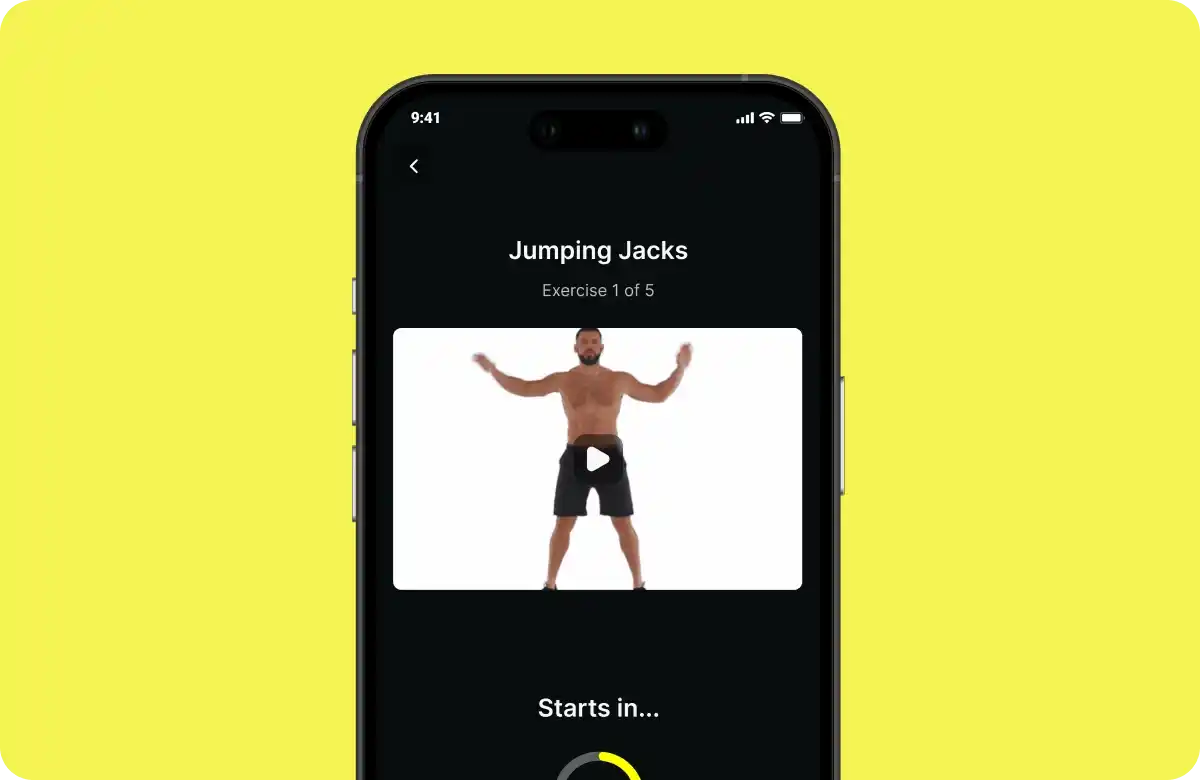
AI-Powered Fitness App
Improved user engagement with fitness plans by 30%

AI-Powered Fitness App

AI tailors workouts and nutrition tips to each user, and community challenges keep them on track.

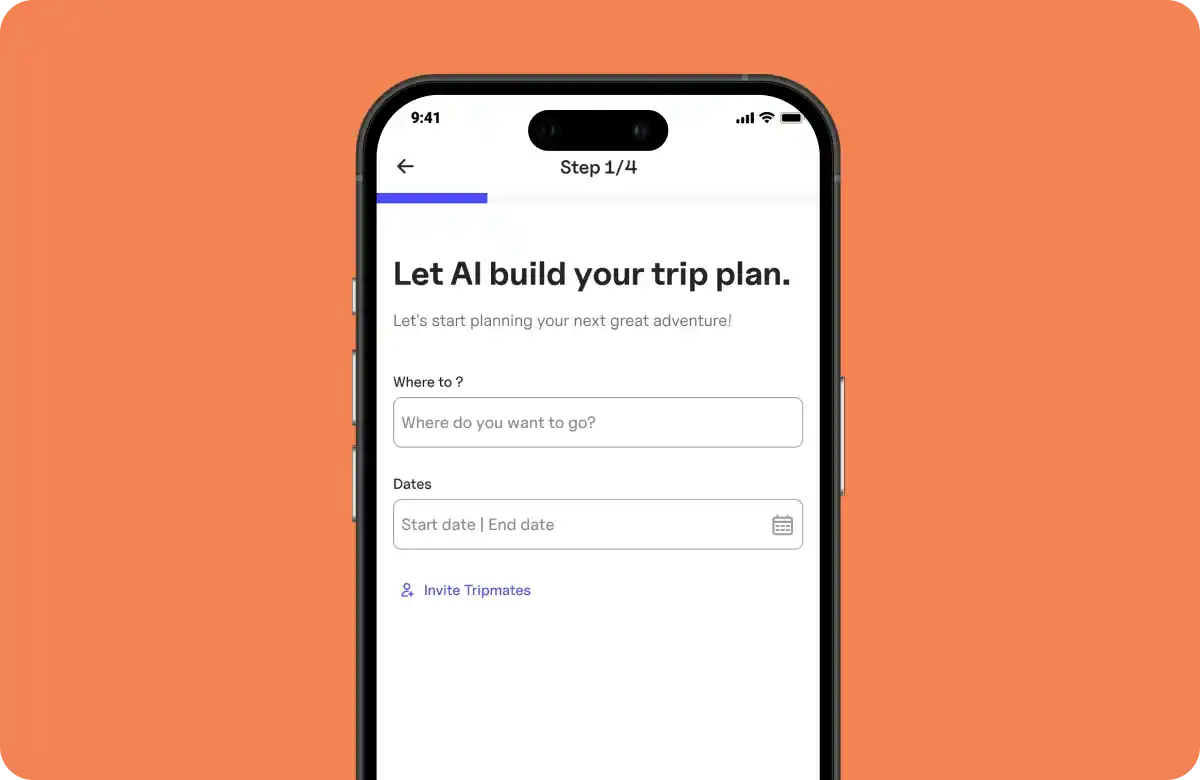
AI Trip Planner App Development
Boosted trip itinerary completions by 21%

AI Trip Planner App Development

AI pulls hotels, transport and attractions into a tailored plan for each trip.

Flutter AI means adding AI features to apps built with Flutter, Google's framework for iOS, Android, web and desktop. Google provides official tools for it, including Firebase AI Logic for Gemini models and the Flutter AI Toolkit for chat interfaces.

Call the ChatGPT API from your own backend, not from the app. The Flutter app sends requests to a server or Cloud Function that holds the OpenAI API key, so the key never ships inside the app. Gemini can also connect through Firebase AI Logic, protected by App Check.

Yes, for tasks such as text recognition, barcode scanning, translation and custom models, using ML Kit or LiteRT. On-device AI works offline and keeps data on the phone. On-device language models still need platform-specific code, because there is no official Flutter plugin for them yet.

Cloud models are more capable and easier to update. On-device models work offline, respond faster and keep data on the phone. Many apps use both, with on-device AI as the fallback.

AI app development cost follows the same bands as any app build: a simple app costs $15,000-$20,000 (6-10 weeks), a standard app $20,000-$40,000 (3-5 months) and a complex app $40,000-$60,000 (5-8 months). AI model usage is billed separately, usually per token, so we estimate running cost during discovery and add limits and caching to keep it predictable. Adding one AI feature to an existing app is scoped as a smaller pilot.

It can be, with the right controls. We ask for user consent before personal data goes to a third-party model, use API plans whose terms exclude training on your data, and run tasks on-device where privacy matters most.

We ground answers in your own content, test them against real examples before launch, limit what the model can do, and give users a way to reach a person.

Start with one feature and a clear success metric, then connect a model to the app: a cloud model such as Gemini through Firebase AI Logic, or an on-device model through ML Kit. We add it to your Flutter app as a pilot, measure the results, and roll it out without rebuilding the app.

Yes. Apple requires apps to get explicit permission before sharing personal data with third-party AI, and Google Play requires a way for users to report offensive AI-generated content. We build both into the feature.

Yes. Teams often hire Flutter AI developers from us to build AI features inside their own team, billed hourly or per project.

Common uses are in-app chatbots, search that understands questions, document and receipt scanning, voice input and translation, personalized recommendations and multi-step automation. The best use removes a task your users already repeat.

For most Flutter apps, the easiest route is Firebase AI Logic, which calls Gemini models from the app without a server of your own. For text recognition, barcode scanning or translation, ML Kit runs on the device at no per-request cost. Both are quick to pilot.