Paresh Mayani
01 October 2026
share article


Most AI features don't die in the demo. They die six weeks after launch.
The demo is the easy part. You wire a text field to the Gemini API, type a friendly prompt, and something clever comes back. Everyone claps. Then real users show up. They paste nonsense, go offline mid-request, hit your free quota on day three, and screenshot the one wrong answer the model gave at 2am. None of that was in the demo. All of it is production.
I run a Flutter team, so I'll be upfront about the bias: we ship these features for clients, and we've watched the gap between "works on my machine" and "survives real traffic" sink more than one launch. This guide is about closing that gap. It's about building Flutter and Dart apps where the AI is a feature users trust, not a liability your support inbox pays for.
A quick scope note before we start. This article is about putting AI features inside your app, things like a support assistant, a document summarizer, or a photo-to-text tool. If what you actually want is AI that helps you write the Flutter code faster, that's a separate topic, and we covered the tools for it in Best AI for Flutter.
A production-ready AI feature isn't one that gives a good answer. It's one that behaves predictably when the answer is bad, the network is down, or the user is hostile.
That changes how you build. You stop designing for the happy path and start building for all of them. A deterministic function returns the same output for the same input. A large language model is more like a sharp but moody expert. Brief it well and it's great. Ask it the same thing tomorrow and the wording shifts. Give it a vague prompt and it fills the gaps its own way. You can't make it perfect. You can design around the fact that it won't be.
So the real work splits into a few questions. What's the stack in 2026? Which model do you pick? How do you keep it secure and affordable? And what do the app stores now demand before they'll let your AI feature ship? Let's take them in order.

Here's the single most common mistake I see in older tutorials: they tell you to install the wrong package.
The Dart AI ecosystem went through three names in about two years, and a lot of blog posts never caught up. If a guide tells you to add google_generative_ai, close the tab. That was the original package, and it's deprecated. Its successor, firebase_vertexai, was deprecated at Google I/O 2025. The current, correct package is `firebase_ai`, and it talks to both the Gemini Developer API (which has a no-cost tier for development) and the Agent Platform Gemini API (the production provider, formerly Vertex AI) through the same code.
| Package | Status | Use it? |
| google_generative_ai | Deprecated (original) | No |
| firebase_vertexai | Deprecated at Google I/O 2025 | No |
| firebase_ai | Current | Yes |
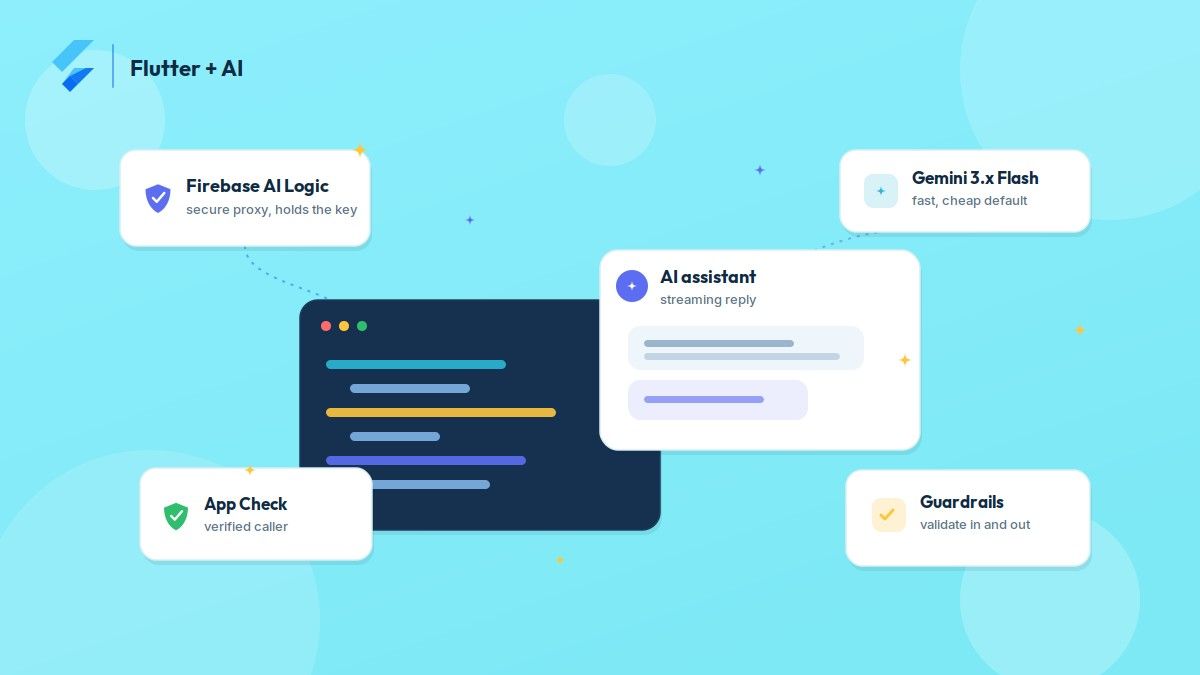
The reason firebase_ai matters isn't just naming. It plugs into Firebase AI Logic, and that's the piece that makes client-side AI safe to ship.
Before this existed, the only way to call Gemini from a Flutter app was to bake an API key into the client. Anyone who decompiles your APK, which takes about thirty seconds, finds that key and spends your money. Firebase AI Logic fixes this by sitting between your app and the model as a secure proxy. The key stays on Google's servers. Your app never holds it.
Firebase App Check is the second half. It uses Play Integrity on Android and App Attest on iOS to confirm the request came from your genuine app on a real device, not a script or a modified build. The official Flutter "Create with AI" guide walks through the setup, and I'll say plainly what the handbooks say: App Check is not optional for production. It's the thing standing between you and a surprise bill.
Gemini comes in tiers, and the wrong default can quietly multiply your costs.
First, a currency check that trips up most tutorials. As of late 2026 the Gemini 2.5 line is being retired, Google began shutting those models down in October 2026, and the current generation is Gemini 3.x. If a guide still tells you to use Gemini 2.5 or 1.5, it's already out of date.
Gemini 3.x Flash is the sensible starting point for most features. It's fast, it's cheap, and it handles text, images, and documents. Flash-Lite goes lighter still for high-volume, latency-sensitive work. Gemini 3 Pro is the heavy hitter for complex reasoning, and you pay for it in both money and speed.
My rule of thumb on client projects: start every feature on Flash. Promote only the specific features that actually need Pro, and only after you've proven the quality gap is real. Don't reach for the expensive model out of habit.
| Model | Best for | Trade-off |
| Gemini 3.x Flash | Most production features | Strong default balance |
| Gemini 3.x Flash-Lite | High volume, speed-sensitive | Less capable |
| Gemini 3 Pro | Complex reasoning, long content | Higher cost and latency |
Cost is where teams get caught off guard. These APIs bill by tokens, roughly the words in your prompt plus the words in the reply. Ten test calls cost nothing. Ten thousand daily users making five calls each is a different story. A bloated system prompt adds its token cost to every single request. Sending the full chat history on every turn multiplies as the conversation grows. The context window is large, but that cuts both ways: you pay for everything you stuff into it.
Three habits keep this sane. Trim your system instruction to the essential rules, usually a hundred to two hundred words. Cap conversation history to a sliding window of recent turns. Set billing alerts in the Google Cloud Console and a per-user daily limit before launch, not after the invoice arrives.
The official Flutter AI best practices make a point I repeat to every engineer on my team: use Flutter itself to build guardrails around the AI. You validate before you send, and you validate after you receive.
Before sending, check the obvious things. Is the prompt empty? Too long? Does it contain an injection attempt like "ignore your previous instructions"? A short list of known patterns plus a hard length cap stops most of the cheap attacks and saves you the API call.
After receiving, never trust the output blindly. The firebase_ai response tells you why the model stopped. A normal finish is safe to show. A safety block means the content tripped a filter, and your UI should say so in plain language instead of rendering a blank card. A truncated response means you hit the token ceiling. Handle each case as a first-class outcome, not an error you forgot about.
For anything structured, ask the model for JSON with a schema, then parse and check that JSON against the shape you expect before it ever touches your UI. And when a feature needs real data, like a user's account balance, use function calling. The model asks your app to run a specific function and gets back only what that function returns. It never gets raw access to your database.
One more guardrail is about honesty, not code. Label AI output as AI output. Give users a way to flag a bad response. That's good design, and as we'll see, it's also the law of the stores now.
A good AI feature degrades. It doesn't crash.
The principle I hold teams to is simple: the AI is an enhancement, not the foundation. If the model is down, rate-limited, or slow, the user should still be able to finish the underlying task. A smart-reply box that can't reach the model falls back to a plain text field. A failed AI summary shows the original content instead. Build the fallback first and the feature feels solid even on a bad day.
Offline needs explicit handling because AI features need the network. Check connectivity before you show the entry point, and tell the user clearly why the feature is paused rather than letting a request hang.
Latency deserves a reality check too. Gemini's typical response takes a few seconds, not milliseconds. That's fine for a chat reply. It's wrong for autocomplete, live search, or anything the user expects to feel instant. Streaming the response, showing it word by word as it arrives, makes a three-second wait feel like a conversation instead of a freeze. Make streaming your default for anything generative.
I covered the big one already: never embed the API key in the client, and let firebase_ai with App Check keep it server-side. A few more hold up under real traffic.
Rate-limit per user. Without it, one buggy loop or one malicious user can drain your monthly quota in an afternoon. Keep an in-memory limiter for quick checks, but back it with a server-side count in Firestore or your own backend, because in-memory state resets the moment the app restarts.
Pin your model versions on purpose. Use an exact version string, not a floating alias, because Google updates these models and an update can change how yours behaves. It moves fast, the 2.5 line is already retiring, so pin a current 3.x build and watch the model lifecycle page. When you adopt a new version, test your system instruction and safety settings against it first, then roll it out in a controlled way. Firebase Remote Config is useful here. It lets you switch models, adjust safety thresholds, or disable a feature without shipping a new build and waiting on store review.
This is the section that turns into a rejection letter when ignored, so I'll be specific.
Google Play has had an AI-Generated Content policy in its Developer Program since 2024, strengthened in January and July of 2025. The part teams miss most is the user feedback requirement. Any app that generates AI content must give users a way to flag or report it, and that report has to go somewhere a human reviews. A thumbs-down on each AI message is enough to satisfy the mechanism. Shipping without it puts a live app at risk of removal. On top of that, you're responsible for configuring safety settings for your audience, and every piece of AI content needs a visible label. You can read the current rules in the Google Play AI-generated content policy.
Apple moved too. On 13 November 2025 it revised its App Review Guidelines, adding explicit language in Guideline 5.1.2(i): you must clearly disclose when personal data will be shared with third parties, including third-party AI, and get the user's permission before you do it. In practice that means a clear, up-front consent step the first time someone uses an AI feature, not a buried line in your privacy policy. Apple's reviewers also compare your privacy policy, your App Store nutrition label, and your in-app disclosures. If those three don't match, you get bounced.
Neither store exempts AI from the rest of its rules. The AI policy sits on top of everything else you already follow.

Not every feature should use AI, and knowing the difference is part of the job.
AI earns its place on tasks that are language-shaped: summarizing long content, answering scoped support questions in the user's own words, turning raw data into a readable insight, or reading a photo of a receipt or a label. A well-scoped support assistant can handle a large share of routine questions without a human, in any language, which is hard to build any other way.
It's the wrong tool when the answer has to be right and a wrong one can't be undone. Don't let a model compute a financial balance, a medication dose, or any figure a user will act on without checking. Don't ship AI-generated legal, medical, or financial advice, even with a disclaimer, because the liability lands on you. And be honest about upkeep: a system instruction that behaves today can surprise you after a model update, so AI features need ongoing monitoring that deterministic features don't.
When we take on a Flutter app with an AI feature, the AI is usually the smallest part of the estimate. The real engineering is the layer around it. You want a clean service boundary so the model is one swappable part. You want proper state management for streaming replies. You want App Check and rate limits on day one. You want store rules built into the UI, not bolted on before you submit. And you want a fallback for every way it can fail.
We did exactly this on the AI translation app in our case studies, where the hard problems were latency, offline behavior, and cost control, not the translation call itself. If you're planning an AI feature and want it to survive contact with real users, that's the work our Flutter app development team does, and you can hire Flutter developers from us for it directly.
The model is the easy 10%. The production-ready 90% is what keeps the feature live.
Use firebase_ai. It's the current official package and replaces both google_generative_ai and firebase_vertexai, which are deprecated. It connects to the Gemini Developer API for development and the Agent Platform Gemini API (formerly Vertex AI) for production through the same code.
You don't strictly need it, but Firebase AI Logic with App Check is the practical way to keep your API key off the client and block abuse. Calling a model API directly from the app means shipping a key that anyone can extract, which is why we don't do it for production.
Start with Gemini 3.x Flash for most features because it balances speed, cost, and capability. Move specific features to Gemini 3 Pro only when you've confirmed they need the extra reasoning, and use Flash-Lite for high-volume, speed-sensitive work. The Gemini 2.5 line is being retired in October 2026, so pin a current 3.x version.
Google Play requires a user feedback mechanism, visible AI labeling, and appropriate safety settings. Apple requires clear disclosure and explicit consent before sending personal data to a third-party AI, under Guideline 5.1.2(i) from its November 2025 guidelines. Both expect you to prevent harmful output, not just rely on the model's defaults.
You're billed by tokens, so trim your system instruction, cap conversation history to recent turns, compress images before sending, cache repeated queries, and set per-user daily limits plus billing alerts before launch.
AI coding tools can speed up a lot of the work, but that's a different question from building AI features into an app. We break down the assistants and their limits in our guide to the best AI for Flutter.
Let’s begin a collaborative journey together where we craft Flutter applications that set benchmarks for you.