Apache Cordova's documentation describes a hybrid app in one line. The app executes in a WebView within the native application wrapper.
That is what hybrid app development means. You build one web app in HTML, CSS and JavaScript, then ship it to the app stores inside a native shell. Cross-platform frameworks such as Flutter and React Native work differently, and fully native apps are a third category.
We build Flutter apps and supply Flutter developers, so we have an interest in this choice. We've tried to be fair about Flutter's weaknesses, and we say where a WebView hybrid is the smarter option.
Key takeaways
- Web team with an existing Angular, React or Vue app. A WebView hybrid built with Ionic and Capacitor reuses the most work.
- Product that needs a custom UI on iOS and Android from one team. A cross-platform framework such as Flutter or React Native fits better.
- App for one platform, or one built on the newest OS features. Native Swift or Kotlin is the safer choice.
- Simple tool or content product that does not need the app stores. A progressive web app may be enough.
- Flutter is not a WebView hybrid. It compiles to native code and draws its own UI.
What is hybrid app development?
A hybrid app is a web app packaged as a store app. Ionic's own guide says the UI layer executes in a web browser on the mobile device, known as a Web View control. Plugins pass messages over a native bridge when the app needs the camera, storage or other device features.
Today the main hybrid tools are Ionic with Capacitor, and the older Apache Cordova. Teams write the app once with web frameworks and reuse most of it on the web as well.
Older articles often list Xamarin as a hybrid framework. That was never accurate, because Xamarin compiled C# rather than running a WebView. Microsoft also ended Xamarin support on 1 May 2024 and points users to .NET MAUI.

How is cross-platform different from hybrid?
Cross-platform frameworks also share one codebase across iOS and Android. The difference is that the UI does not run inside a browser engine.
React Native runs JavaScript, but it creates the corresponding Android and iOS views for each component at runtime. A button on screen is a real platform button, not an HTML element.
Flutter goes further and compiles Dart ahead of time to ARM or x64 machine code. It then draws every widget with its own renderer, as our explainer on whether Flutter is native covers in detail.
Where do native apps and PWAs fit?
Native apps are written separately for each platform, usually in Swift or SwiftUI for iOS and Kotlin for Android. They get every new OS feature first, at the cost of two codebases and often two teams.
Progressive web apps sit at the other end. MDN defines a PWA as an app built using web platform technologies that still feels like a platform-specific app. Users install it from the browser, so it skips app store review.
Hybrid vs native vs cross-platform compared
The table compares all five approaches on the same criteria. It reflects documentation checked in November 2026.
| Criteria | WebView hybrid (Ionic, Capacitor, Cordova) | Flutter | React Native | Native (Swift, Kotlin) | PWA |
|---|---|---|---|---|---|
| UI built with | HTML, CSS and JavaScript | Dart widgets | React components in JavaScript or TypeScript | SwiftUI, UIKit, Jetpack Compose or Android views | HTML, CSS and JavaScript |
| How the UI runs | Inside a WebView in a native shell | Compiled machine code, drawn by Flutter's renderer | JavaScript engine driving real platform views | Compiled machine code with system controls | In the browser |
| Codebases for iOS and Android | One | One | One | Two | One |
| Reuse of an existing web app | High | Low, different language | Medium, skills and some logic | None | High |
| Device API access | Through plugins over a bridge | Through plugins and native interop tools | Through native modules | Direct | Limited to browser APIs |
| Look and feel | Web UI styled to look native | Custom UI, identical on each platform | Platform controls | Platform controls | Web UI |
| Main weakness | Browser engine limits heavy animation and complex screens | Native design changes arrive late, and the engine adds app size | More per-platform testing and native module upkeep | Two codebases to build and maintain | No app store presence and fewer device features |
The weakness row is our judgement, not a measured benchmark. Test a real screen on a mid-range Android phone before you commit to any approach.
Where does Flutter fit among these approaches?
Flutter is a cross-platform framework with no WebView in its mobile apps. Its architectural overview describes three layers that explain why.

- Embedder. A platform-specific host loads Flutter into an Android Activity or an iOS view controller and handles input and app lifecycle.
- Engine. Mostly written in C++, it runs your compiled Dart code and renders frames.
- Framework. Written in Dart, it holds the widgets, layout and animation APIs that developers use every day.
The engine renders with Impeller, which is the default on iOS, Android API 29 and newer, and desktop. Skia remains only in Flutter web, which does not use Impeller yet.
Which hybrid app problems does Flutter avoid, and which does it keep?
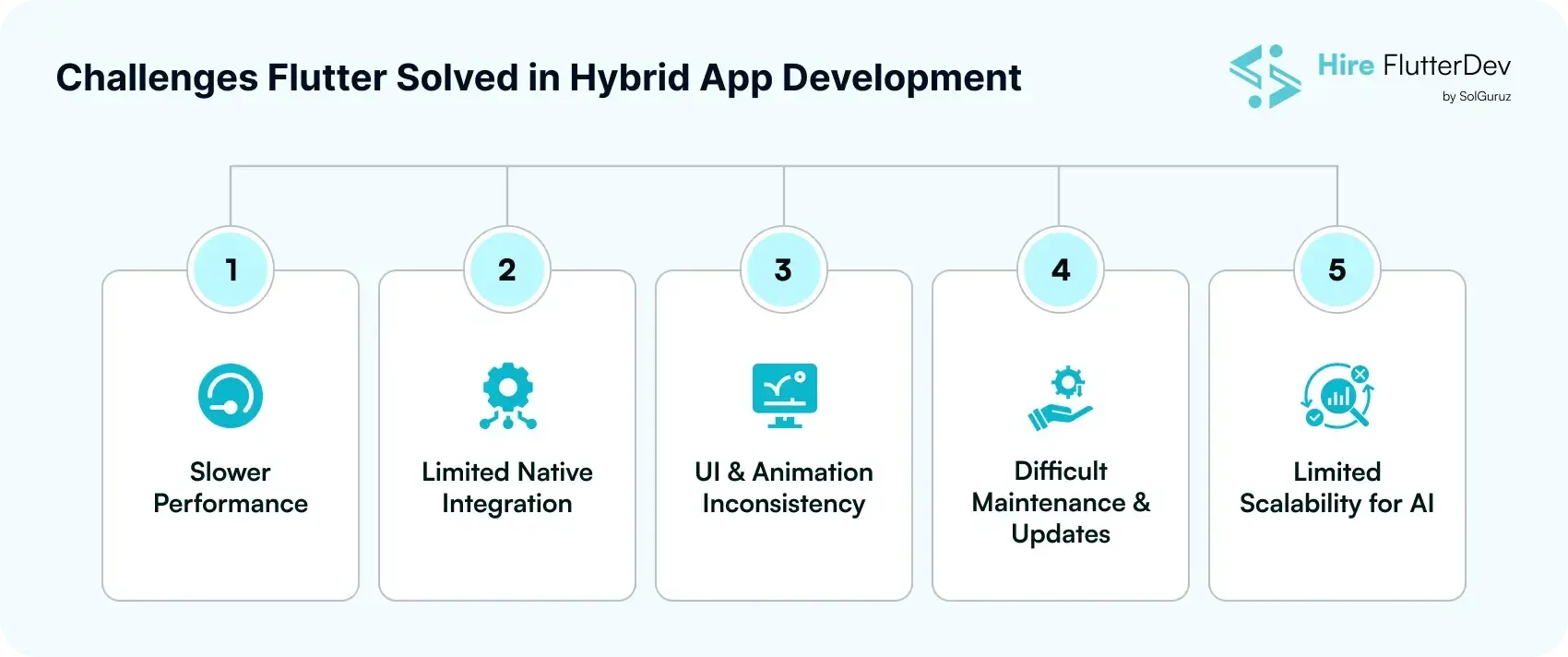
Teams that outgrow WebView hybrids usually describe the same five problems. Here is how Flutter handles each one, including where it does not help.
- Slow complex screens. Flutter runs compiled code and draws its own frames, so long lists and animations do not depend on a browser engine.
- Limited native integration. Flutter reaches device APIs through plugins and interop tools, but platform-only features still need some Swift or Kotlin.
- UI that differs between devices. Flutter paints identical pixels on each platform, so it avoids WebView version differences.
- Hard maintenance. One codebase helps, yet you still test on both platforms and keep up with quarterly framework releases.
- On-device AI. Flutter's November 2026 release added a MediaPipe package with 20 on-device vision, audio and text tasks, according to the release announcement.
When is a WebView hybrid still the better choice?
A hybrid app is often the right call, and choosing Flutter there would waste money. These are the cases where we would advise against a rewrite.
- You already have a strong web app and web team. Wrapping it with Capacitor reuses code and skills that Flutter would throw away.
- The app is mostly forms, lists and content. A WebView handles that comfortably, and users will not notice the difference.
- You need the same code on your website. Flutter web is a poor fit for pages that must rank in search, as our post on Flutter for web development explains.
- It is an internal tool with a short life. Speed of delivery matters more than polish for a pilot or event app.
Who should pick which approach?
- Founders validating an idea on a web budget. Start with a PWA or a Capacitor hybrid and move later if traction justifies it.
- Startups whose app is the product. Choose Flutter or React Native for a custom, responsive UI on both stores from one team.
- Teams with deep React skills. React Native keeps their language and tools, as our Flutter vs React Native comparison shows.
- Brands with a strong visual identity. Flutter gives the most control over how every screen looks.
- Companies building for one platform or for watches, widgets and AR. Go native with Swift or Kotlin.
What mistakes do teams make with hybrid apps?
- Calling every cross-platform tool hybrid. Flutter and React Native do not run their UI in a WebView, so hybrid benchmarks do not apply to them.
- Rewriting too early. A slow hybrid app sometimes needs profiling and fewer heavy screens, not a new framework.
- Rewriting all at once. Moving a large app screen by screen keeps it shippable while the new version grows.
- Ignoring the web side. Decide early whether your website is content for search or an app for logged-in users.
If a staged move to Flutter makes sense, our Flutter app migration service plans the order of screens with you.
Frequently asked questions
Is Flutter a hybrid app framework?
No. Flutter compiles Dart to native machine code and draws its own UI, with no WebView in mobile apps. It is better described as a cross-platform framework.
Is React Native a hybrid framework?
React Native is not a WebView hybrid either. It runs JavaScript, but it renders real iOS and Android views for its components. Most people group it with Flutter as a cross-platform framework.
Is hybrid app development cheaper than native?
It is usually cheaper, because one web codebase covers iOS, Android and often the web. The saving is largest when you already have a web app and a web team. The trade-off is weaker performance on complex, animation-heavy screens.
Can a hybrid app feel native?
For simple screens such as forms, settings and content, a well-built hybrid app can feel close to native. Users tend to notice the gap in long lists, gestures and rich animation. Test those screens on mid-range Android phones before you decide.
Should I rebuild my Ionic or Cordova app in Flutter?
Only if the current app is holding back your product, for example through slow screens or a design you cannot achieve. If it works well, profiling and targeted fixes usually cost less. When you do move, migrate in stages rather than all at once.
Choosing your approach
Pick a WebView hybrid when you are reusing a web app and team. A cross-platform framework fits when one team must ship a custom app to both stores. Native is the safer route when one platform or the newest OS features define the product.
If cross-platform is your answer, our cross-platform app development team builds with Flutter and offers a one-week free trial.